

Free Poker HUD Tools: How to Track Your Game Without a Subscription
On this page
Let’s be honest. When you’re grinding micro stakes, paying $20 a month or $100 upfront for poker software can feel like a lot. That money could go straight into your bankroll instead.
The good news is you don’t always have to pay to get started. There are genuinely useful free poker HUD tools and trackers out there, and some of them are good enough to carry you for months while you build your game.
In this guide, we’ll walk through the best free HUD poker options available in 2026, what each one does well, where the limits are, and when it actually makes sense to upgrade.
What Does a Free Poker Tracker Actually Do?
A poker tracker reads the hand history files your poker site saves on your computer. It stores every hand in a database so you can review your results, spot leaks and study your opponents.
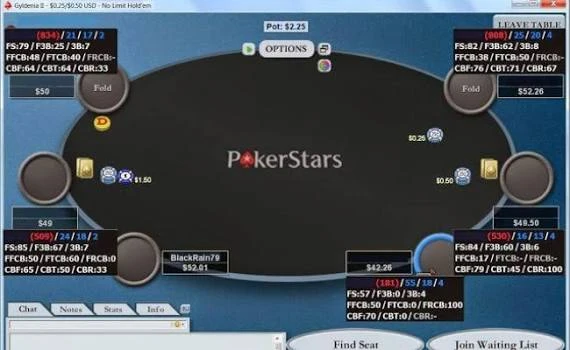
A HUD (Heads-Up Display) takes that data and shows it live on the table, right next to each player. At a glance, you can see things like how often someone plays a hand (VPIP) or how often they raise before the flop (PFR).
Most free tools fall into one of three groups: genuinely free software, paid software with a free tier, and full programs you can use free for a limited trial.
The Best Free Poker HUD Tools in 2026
1. Hand2Note BASE – The Best Free Option for Most Players
If you want a modern HUD without paying anything, Hand2Note is the first place to look. New users get a free trial with full access, and when the trial ends, the software automatically switches over to the free BASE version.
That BASE version isn’t a stripped-down demo either. It works at all stakes and includes a static HUD, general and session reports, and custom stats.
What you don’t get are the advanced tools. Features like dynamic HUDs, decision EV analysis, advanced stats and range research are kept for paying users.
Best for: Micro and small stakes players who want a proper HUD for free.
2. FPDB (Free Poker DataBase) – Fully Free and Open Source
FPDB is the true “no strings attached” option. It’s a HUD and stats tracker that lets you review statistics on yourself and your opponents, both live at the table and after a session. It covers Hold’em, Omaha, Stud and Razz.
It’s completely free and open source, and it runs on Mac, Windows and Linux. That makes it especially handy if you play on Linux, where most commercial trackers aren’t available.
The trade-off is polish. FPDB is a community project, so setup can take more effort and site support may not be as wide as the paid tools.
Best for: Tech-savvy players, Linux users, and anyone who refuses to pay for software.
3. PokerTracker 4 and Hold’em Manager 3 – Try Before You Buy
PokerTracker 4 and Hold’em Manager 3 are the two biggest names in poker tracking. Neither is free forever, but both offer free trials with full access, so you can test everything before you spend a cent.
Hold’em Manager 3 offers a 14-day free trial, and PokerTracker 4 also lets you use the full program free for a trial period. Trial lengths can change, so check each company’s website for the current offer.
These trials are perfect for comparing tools side by side. Run both during a few sessions and see which one feels more natural to you.
Best for: Players who are thinking about buying a tracker and want to test the market leaders.
4. Built-In Poker Site Tools – Free and Already There
Some poker sites have their own stats tools built into the software. GGPoker is a great example. It doesn’t allow any third-party HUDs while its client is running, but players can use the built-in PokerCraft tool to review their sessions afterwards.
These tools won’t give you a live HUD, but they’re free, easy to use and fully allowed by the site.
Best for: Recreational players and anyone playing on sites that ban HUDs.
Budget Option Worth Knowing: DriveHUD 2
DriveHUD 2 isn’t free, but it’s worth mentioning for players on a tight budget. It’s often described as one of the cheapest serious trackers available, with plans starting from $23.99 a year for micro stakes.
If you outgrow the free options but don’t want to spend $100, this sits nicely in the middle.
Free vs Paid Poker Trackers at a Glance
| Tool | Cost | Live HUD | Best For |
| Hand2Note BASE | Free (paid upgrades available) | Yes (static) | Most micro and small stakes players |
| FPDB | Free, open source | Yes | Linux users, budget players |
| PokerTracker 4 | Free trial, then paid | Yes | Testing a market leader |
| Hold’em Manager 3 | Free trial, then paid | Yes | Testing a market leader |
| GGPoker PokerCraft | Free, built-in | No | Post-session review on GGPoker |
| DriveHUD 2 | Low-cost paid | Yes | Players on a tight budget |
Check the Rules Before You Use Any HUD
This is the most important step, and many players skip it. Just because a tracker works with a poker site doesn’t mean the site lets you run it during play. Always check the poker room’s current rules on third-party software before using one.
Rules vary a lot. PokerStars keeps a public list of approved tools, while GGPoker bans third-party HUDs altogether. Real-time assistance tools, datamining software and shared databases are generally prohibited.
Breaking these rules can get your account closed, so it’s never worth the risk.
When Should You Upgrade to a Paid Tracker?
Free tools are great for getting started, but there comes a point where paying makes sense. Consider upgrading when:
- You’re moving up beyond micro stakes and need deeper analysis.
- You want dynamic or positional HUDs that change stats based on the situation.
- You’re putting in serious volume and need faster, more stable performance with a large database.
- You want advanced study tools like range research or EV analysis.
If you’re still learning the basics, though, a free tracker will teach you a lot about your own game.
Tips for Getting the Most From a Free HUD
Keep it simple. Start with a handful of stats like VPIP, PFR, 3-Bet% and C-Bet%. A cluttered HUD is hard to read in real time.
Review your own game, not just opponents. The biggest gains often come from spotting your own leaks.
Respect sample size. A stat based on 20 hands doesn’t tell you much. Give it time.
Back up your database. Free or paid, losing thousands of hands to a computer crash hurts.
Conclusion
You don’t need a subscription to start tracking your poker game. Hand2Note BASE gives most players a solid free HUD, FPDB is a great open-source alternative, and the free trials from PokerTracker 4 and Hold’em Manager 3 let you test the industry leaders before spending anything.
FAQs
Is there a completely free poker HUD?
Yes. FPDB is fully free and open source, and Hand2Note offers a free BASE version with a static HUD
Is Hand2Note really free?
After the free trial, Hand2Note switches to the BASE version, which you can keep using for free. Advanced features need a paid plan.
Can I use a HUD on GGPoker?
No. GGPoker doesn’t allow third-party HUDs, but you can use its built-in PokerCraft tool to review your play.
Do PokerTracker 4 and Hold’em Manager 3 have free versions?
They don’t offer free-forever versions, but both have free trials so you can test them before buying.
Disclosure: PokerClubGames may earn a commission when you use links to poker operators. This never changes the price you pay. 18+ (21+ where required). Gambling involves risk. How we make money